
Does Fast Charging Damage Your Battery? What DFW Phone Owners Need to Know


If you have ever plugged your phone into one of those 65-watt or 120-watt chargers and wondered whether you were quietly destroying your battery, you are not alone. This is one of the most common questions I hear from customers who come into our shop. Almost every week, someone sits across the counter and asks some version of the same thing: "I use fast charging all the time. Is that why my phone only lasts half a day now?" The short answer is that fast charging can harm your battery, but the full picture is a lot more nuanced than most tech articles make it sound.
As a repair technician who has replaced thousands of batteries on iPhones, Samsung Galaxy phones, and everything in between, I want to give you a straight answer grounded in what we actually see on the bench. Not marketing language, not manufacturer spin. Just the real story about what fast charging does to your battery, how serious the damage can be, and what you can do about it right here in the DFW area.
How Fast Charging Actually Works
To understand whether fast charging damages your battery, you need a basic picture of what is happening inside your phone. Modern smartphones use lithium-ion batteries. These batteries store energy by moving lithium ions between two electrodes: an anode and a cathode. When you charge the phone, those ions travel one direction. When you use the phone, they travel back.

Standard charging pushes those ions at a relatively relaxed rate, which gives the battery material time to absorb energy evenly. Fast charging, whether it is Apple's MagSafe, Qualcomm Quick Charge, Samsung's Adaptive Fast Charging, or any other proprietary standard, pushes more electrical current through the battery in a shorter window. According to Apple's official battery health documentation, lithium-ion batteries have a limited number of charge cycles before capacity begins to drop noticeably.
The heat generated during high-speed charging is the real culprit. Lithium-ion chemistry is sensitive to temperature. When a battery gets warm repeatedly, the internal structure degrades a little faster each time. The electrodes develop microscopic stress fractures. The electrolyte breaks down. Over hundreds of cycles, that wear adds up in ways you start to feel in your daily battery life.
Does That Mean Fast Charging Is Always Harmful?
Not exactly. Phone manufacturers have invested heavily in charge management chips and algorithms designed to limit the damage. Most flagship phones today use a two-stage charging process: they push hard at the beginning when the battery is cool and below about 50 percent capacity, then they slow down as the battery fills up and warms. This is why your phone goes from 0 to 80 percent quickly but then seems to crawl from 80 to 100 percent. That slowdown is intentional and protective.
So if you use the official charger that came with your phone, the risk is relatively managed. The problem often comes from third-party chargers that do not properly communicate with your phone's charge controller, or from charging habits that push already-warm batteries even harder.
Does Fast Charging Damage Your Battery Over Time? What We See at the Bench

Here is what I can tell you from the repair side of things. We see a noticeable difference in battery health between customers who have been careful about their charging habits and those who have not. A phone that is two years old and has been fast-charged daily, often while gaming or running GPS navigation, regularly comes in with battery health readings in the low 70s or even the high 60s. A phone the same age that was mostly slow-charged overnight will often still be sitting at 85 percent capacity or higher.
Research documented in iFixit's lithium-ion battery guide confirms that charging speed combined with heat is one of the most significant contributors to accelerated capacity loss in lithium-ion cells. The faster you charge and the hotter the battery gets, the faster you burn through those charge cycles.
I had a customer come in not long ago with a Samsung Galaxy S23 Ultra she had owned for about eighteen months. She was a real estate agent, always in her car, always running navigation and taking calls while her phone sat on a wireless charging pad stuffed into a hot cup holder. Her battery health was already at 71 percent. She was getting maybe four hours of screen-on time from a full charge. We replaced her battery for $79, and she walked out with a phone that felt brand new. The combination of fast charging plus the constant heat from a Texas car interior had aged that battery in roughly half the expected time.
If you have a Samsung and are worried about what fast charging has done to your battery, our Samsung phone repair services include battery diagnostics and replacement with quality cells. And if you are on an iPhone, our iPhone repair team can check your battery health in minutes and give you an honest recommendation on whether a swap makes sense for your situation.
The Worst Habits That Accelerate Battery Damage
Fast charging alone is rarely the only factor. In our experience, the customers with the worst battery health are usually combining several of these habits at once.
Charging in a Hot Car or Direct Sunlight
Heat is the single biggest enemy of lithium-ion batteries. Charging your phone while it sits in a hot car compounds the thermal stress from fast charging. If your car interior climbs above 90 degrees on a DFW summer afternoon, and they absolutely do, you are running a battery stress test every time you plug in during your commute. Leaving your phone on the dash in direct sunlight while charging is genuinely one of the worst things you can do to battery longevity.
Using Cheap Third-Party Chargers
A no-name fast charger from a gas station or a discount website does not have the same charge management circuitry as a certified charger. It may claim 65 watts but deliver that power inconsistently, spiking voltage in ways that damage the battery chemistry faster than any legitimate fast charger would. This is also a safety issue beyond just battery health, particularly with cheaper cables that lack proper shielding.
Keeping the Phone at 100 Percent Constantly
Lithium-ion batteries are healthiest between about 20 and 80 percent charge. Keeping your phone plugged in and sitting at 100 percent for hours puts the battery in a state of constant high-voltage stress. Many phones now include optimized charging settings that pause the charge at 80 percent and finish right before your alarm goes off. A lot of users have never turned that feature on, and it is worth doing today.
Charging a Hot Phone After Heavy Use
If you just finished an hour of gaming or a long video call and your phone is warm to the touch, letting it cool down for ten or fifteen minutes before plugging in will measurably reduce the heat spike during the first phase of fast charging. This is a small habit change with a real payoff over the life of the battery.
What Battery Replacement Actually Costs in DFW
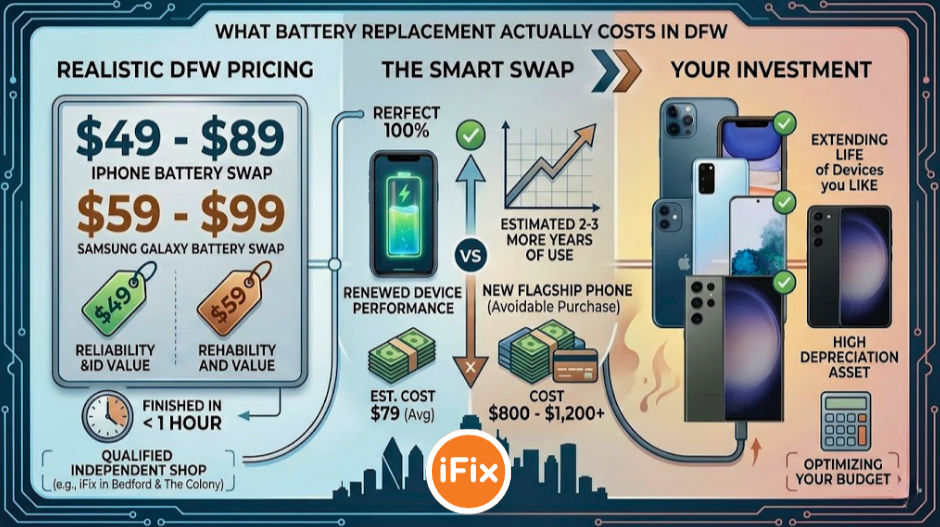
One of the biggest misconceptions we hear is that battery replacement is expensive or complicated. It is neither. At iFix, iPhone battery replacements run between $49 and $89 depending on the model, and most jobs are finished in under an hour. Samsung Galaxy battery replacements typically run between $59 and $99. Compared to the cost of a new flagship phone, which often runs $800 to $1,200 or more, a battery swap is one of the smartest investments you can make in a device you already know and like.
We serve customers from all over the DFW metro at our Bedford and The Colony locations, and battery replacements are consistently one of our most requested services, especially as more people hold onto their phones for three or four years rather than upgrading annually. To see the full range of repairs we handle, visit our complete services page.
How iFix Can Help
Whether your battery has already taken a hit from years of fast charging or you simply want to know where you stand, the first step is a battery health diagnostic. Our technicians can read the actual charge cycle count and maximum capacity of your battery in just a few minutes and give you an honest recommendation on whether replacement makes sense for your specific situation.
We use quality replacement cells, back our work with a warranty, and turn most battery jobs around the same day. If you are tired of carrying a charger everywhere or watching your battery percentage drop faster than it should, do not put it off any longer. You can book your repair appointment online right now and skip the wait.
Frequently Asked Questions
Does fast charging harm your battery faster than regular charging?
Yes, to a measurable degree, but modern phones are engineered to manage the risk. The charge management chips in flagship iPhones and Samsung Galaxy devices slow down the charge rate as the battery heats up or approaches full capacity. The bigger risk comes from using low-quality third-party chargers, charging in hot environments like a car on a Texas summer day, or leaving your phone plugged in and sitting at 100 percent for extended periods. If you use your manufacturer's official charger and avoid charging in high heat, the real-world difference between fast and slow charging is much smaller than most people expect.
How do I know if my battery has already been damaged by fast charging?

On iPhones, go to Settings, then Battery, then Battery Health and Charging. Anything below 80 percent maximum capacity means Apple considers the battery degraded. On Samsung Galaxy devices, you can dial *#0228# to pull up a battery diagnostic screen, or use the built-in Device Care tool under Settings. Signs to watch for in daily use include noticeably shorter battery life, unexpected shutdowns at 20 to 30 percent charge, or a phone that gets unusually warm during light use. Any of these symptoms are worth getting checked out by a technician before the problem gets worse.
Is it worth replacing my phone battery instead of buying a new phone?
In most cases, yes. If your phone is otherwise in good working condition and you are happy with its performance, a battery replacement in the $49 to $99 range can give you another two to three years of reliable daily use. That math is hard to argue with when a new flagship costs $800 to $1,200. The only situations where a new phone clearly wins over a battery replacement are when the device has multiple other hardware problems, is no longer receiving software security updates, or replacement parts for that model are no longer available. A good technician will give you a straight answer on which situation you are actually in.


Comments